I never paid much attention to my mouse until my wrist started hurting.
At first, I blamed my keyboard. Then I thought maybe I was sitting the wrong way. I even bought a better office chair, hoping the discomfort would disappear. It helped a little, but after spending eight or nine hours editing documents, browsing dozens of tabs, and working on spreadsheets, the pain always came back.
The biggest surprise? The mouse I had been using for years was the real problem.
Switching to an ergonomic mouse didn’t magically solve everything overnight, but within a couple of weeks I noticed something important. My hand felt more relaxed, my wrist wasn’t as stiff at the end of the day, and I stopped constantly stretching my fingers every hour.
If you spend long hours at a desk, choosing the right ergonomic mouse can make a bigger difference than you might expect.
Why Your Regular Mouse Might Be Causing Discomfort
A traditional mouse forces your hand into a flat position. It may not seem uncomfortable during the first hour, but after an entire workday, your wrist and forearm are doing more work than you realize.
Small movements repeated thousands of times each day add up. If your job involves:
- Writing articles
- Editing photos
- Programming
- Graphic design
- Video editing
- Customer support
- Data entry
- Studying for long hours
your mouse becomes one of the most-used tools on your desk.
Many people upgrade their monitor or keyboard but keep using the cheapest mouse they own. I made that mistake myself.
What Makes a Mouse Ergonomic?
An ergonomic mouse is designed to keep your hand in a more natural position.
Instead of twisting your wrist flat against the desk, many ergonomic designs allow your hand to rest at an angle that reduces strain.
Some models also include:
- Comfortable thumb rests
- Better palm support
- Adjustable sensitivity (DPI)
- Lightweight buttons
- Smooth scrolling
- Customizable shortcuts
The goal isn’t just comfort—it’s reducing fatigue during long work sessions.
Best Ergonomic Mouse for Long Work Sessions
1. Logitech MX Master 3S
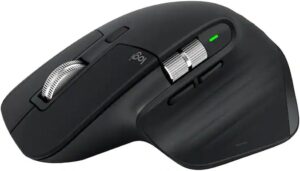
For many people, this is the gold standard.
I’ve used the MX Master series during long writing sessions, and what stands out most is how naturally your hand rests on it. The thumb support feels comfortable, and the shape encourages a relaxed grip instead of squeezing the mouse.
What I like:
- Excellent hand support
- Quiet clicks
- Fast, smooth scrolling
- Long battery life
- Works on multiple devices
- Custom buttons through Logi Options+
Best for:
- Writers
- Office work
- Programmers
- Designers
- Everyday productivity
The only downside is that it’s larger than average, so people with very small hands may prefer something more compact.
2. Logitech Lift Vertical Ergonomic Mouse
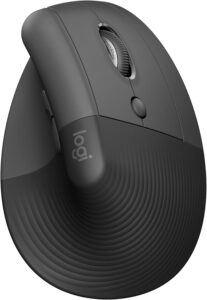
This mouse looks unusual at first because it stands almost upright.
The first few hours felt strange to me. My brain kept expecting a normal mouse, and my movements weren’t as accurate. By the second day, though, it started feeling natural.
The vertical design keeps your wrist in a handshake position, which many users find more comfortable over time.
Great features include:
- Lightweight design
- Quiet buttons
- USB-C charging
- Bluetooth connectivity
- Comfortable grip
It’s especially good for people who already experience wrist discomfort.
3. Logitech MX Vertical
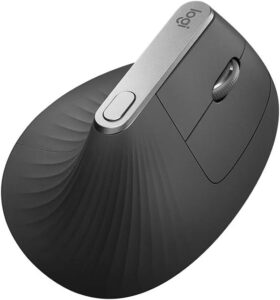
If you’re serious about ergonomics, the MX Vertical is worth considering.
Compared to the Lift, it feels more premium and is slightly larger.
The steeper angle helps reduce forearm rotation, making it a popular choice among professionals who spend their entire day at a computer.
It’s ideal for:
- Software developers
- Editors
- Engineers
- Full-time office workers
Like most vertical mice, expect a short learning period before you become comfortable.
4. Anker Wireless Vertical Ergonomic Mouse
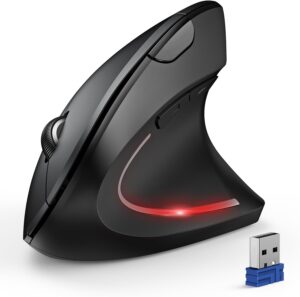
Not everyone wants to spend premium money.
The Anker Vertical Mouse offers many ergonomic benefits at a much lower price.
It doesn’t feel as refined as Logitech’s premium models, but it performs surprisingly well for everyday work.
Pros:
- Affordable
- Comfortable grip
- Easy to use
- Wireless connection
- Good battery life
If you’re curious about vertical mice but don’t want to invest a lot, this is an excellent starting point.
5. Razer Pro Click
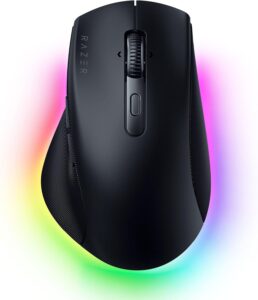
People often think gaming companies only make gaming products.
The Razer Pro Click proves otherwise.
Designed with productivity in mind, it combines excellent ergonomics with a clean professional appearance.
I especially like the responsive buttons and comfortable palm support.
It’s a great option if your day includes both work and occasional gaming.
Features That Actually Matter
When comparing ergonomic mice, marketing terms can become overwhelming.
These are the features that genuinely make a difference.
Comfortable Shape
A mouse should support your entire palm instead of forcing you to grip tightly.
If your fingers are constantly curled or hanging off the edge, the mouse is probably too small.
Adjustable DPI
Higher DPI doesn’t automatically mean better.
For office work, adjustable DPI simply lets you find a cursor speed that feels natural without moving your wrist excessively.
Reliable Wireless Connection
Modern wireless mice are extremely responsive.
I switched from wired years ago and honestly don’t miss the cable at all. A clutter-free desk also feels more comfortable.
Quiet Clicks
This sounds like a small feature until you’re clicking thousands of times every day.
Quiet buttons reduce noise and make long work sessions feel less distracting.
Battery Life
Charging your mouse every few months is much nicer than replacing disposable batteries every couple of weeks.
Choosing the Right Mouse for Your Hand Size
One mistake I made was buying a mouse based only on online reviews.
Nobody mentioned hand size.
A mouse that feels perfect for someone with large hands might feel awkward if your hands are smaller.
As a simple guide:
- Small hands: Logitech Lift
- Medium hands: MX Master 3S
- Large hands: MX Vertical or Razer Pro Click
Whenever possible, check the dimensions before buying.
Tips to Reduce Wrist Pain Even Further
An ergonomic mouse helps, but it isn’t the whole solution.
I noticed even bigger improvements after making a few simple changes.
Keep Your Wrist Neutral
Try not to bend your wrist upward while using the mouse.
Your forearm, wrist, and hand should stay as straight as possible.
Adjust Your Chair
Your elbow should rest close to a 90-degree angle.
If your desk is too high, your shoulder ends up doing extra work.
Move the Mouse Closer
Many people reach too far to the side.
Keeping the mouse close to your keyboard reduces shoulder strain.
Take Short Breaks
Every hour, stand up for a minute or two.
Stretch your fingers.
Roll your shoulders.
Walk around briefly.
These tiny breaks add up more than you’d expect.
Lower Your Grip Pressure
I realized I was squeezing my mouse whenever I concentrated.
Once I relaxed my grip, my hand felt noticeably less tired by the end of the day.
Common Mistakes People Make
Buying the Cheapest Option
Comfort isn’t always expensive, but extremely cheap mice often sacrifice shape and build quality.
A mouse is something you’ll touch for thousands of hours. It’s worth investing in.
Ignoring the Adjustment Period
Switching to a vertical mouse feels unusual.
Some people return it after one day.
Give yourself at least a week before deciding whether it works for you.
Using a Mouse That’s Too Small
A tiny travel mouse may be convenient, but it isn’t ideal for eight-hour workdays.
Choose something that properly supports your hand.
Expecting Instant Results
An ergonomic mouse reduces strain over time.
It isn’t a medical treatment, and it won’t erase years of poor posture overnight.
Combining a better mouse with proper desk setup produces the best results.
Which Ergonomic Mouse Should You Buy?
If I had to recommend one mouse for most people, it would be the Logitech MX Master 3S.
It balances comfort, reliability, battery life, and productivity features extremely well. Whether you’re writing reports, editing photos, coding, or managing dozens of browser tabs, it feels comfortable even after several hours of use.
If wrist pain is already becoming a regular problem, the Logitech Lift or Logitech MX Vertical may be even better because of their vertical design.
If you’re shopping on a budget, the Anker Wireless Vertical Mouse delivers impressive comfort without costing a fortune.
The best ergonomic mouse is ultimately the one that fits your hand, matches your workflow, and encourages better posture. After switching from a standard mouse, I realized that staying comfortable through a full workday isn’t about one expensive upgrade—it’s about using tools that work with your body instead of against it. Your hands do a lot for you every day, and giving them the right support is one of the simplest upgrades you can make to your workspace.