
The Day I Realized My Workspace Was Slowing Me Down
A few years ago, I thought productivity was all about motivation. Whenever I struggled to focus, I blamed myself. Maybe I wasn’t disciplined enough. Maybe I needed another productivity app or a better morning routine.
Then one afternoon, after constantly shifting in an uncomfortable chair, searching for a charging cable, and dealing with a cluttered desk, it hit me: my workspace was working against me.
I started making small changes. Nothing expensive or fancy. Just a few accessories that solved everyday frustrations.
The result surprised me.
I wasn’t suddenly working twice as fast, but I felt less distracted, more comfortable, and able to stay focused for longer periods without feeling mentally drained.
If you’re building a home office, studying for exams, creating content, or working remotely, the right accessories can make a huge difference. Here are the workspace tools that have genuinely improved my productivity.
Quick Comparison Table
| Product | Best For | Price Range | Productivity Impact |
|---|---|---|---|
| Ergonomic Office Chair | Long work sessions | $$-$$$$ | Very High |
| Laptop Stand | Better posture | $-$$ | High |
| Mechanical Keyboard | Comfortable typing | $$-$$$ | High |
| Noise-Canceling Headphones | Deep focus | $$-$$$$ | Very High |
| Desk Organizer | Reducing clutter | $-$$ | Medium |
| Monitor Light Bar | Eye comfort | $$-$$$ | Medium-High |
| Standing Desk Converter | Movement during work | $$$ | High |
| Productivity Timer | Focus sessions | $-$$ | Medium |
1. Ergonomic Office Chair

If I could only recommend one workspace accessory, it would be an ergonomic chair.
For years, I used a cheap dining chair while working from home. My back hurt constantly, and I found myself standing up every few minutes.
After upgrading to an ergonomic office chair with lumbar support, I immediately noticed a difference.
Good posture doesn’t just help your back. It reduces physical discomfort, which means fewer distractions throughout the day.
Pros
- Better posture support
- Reduces back and neck pain
- Comfortable for long sessions
- Improves concentration
Cons
- Can be expensive
- Takes up space
Best For
Remote workers, students, writers, programmers, and anyone sitting more than four hours daily.
2. Laptop Stand

One mistake many people make is looking down at their laptop screen all day.
I didn’t realize how much strain this caused until I started using a laptop stand.
Raising the screen to eye level reduced neck pain and made my desk setup feel much more professional.
Pair it with an external keyboard and mouse for the best experience.
Pros
- Improves posture
- Affordable upgrade
- Creates extra desk space
- Easy to carry
Cons
- Requires external accessories for maximum comfort
- Some models aren’t adjustable
Best For
Laptop users working from home, coffee shops, or coworking spaces.
3. Mechanical Keyboard

I used to think mechanical keyboards were only for gamers.
I was wrong.
After switching from a basic keyboard, typing became more comfortable and satisfying. The improved key feedback reduced typing errors and made long writing sessions feel less tiring.
Writers, content creators, and programmers especially benefit from a quality keyboard.
Pros
- Comfortable typing experience
- Faster and more accurate typing
- Durable construction
- Customizable options
Cons
- Can be noisy
- Higher cost than standard keyboards
Best For
Writers, bloggers, developers, and office professionals.
4. Noise-Canceling Headphones
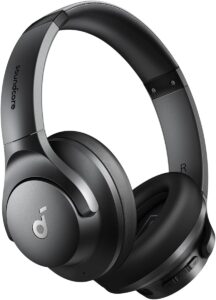
One of the biggest productivity killers isn’t your phone.
It’s noise.
Whether it’s traffic outside, family conversations, or coworkers chatting nearby, background noise constantly steals attention.
I started using noise-canceling headphones during deep work sessions and immediately noticed fewer interruptions.
Even when I’m not listening to music, simply blocking surrounding noise helps me focus.
Popular options include Sony WH-1000XM series and Bose QuietComfort headphones.
Pros
- Blocks distractions
- Improves concentration
- Great for remote work
- Useful during travel
Cons
- Premium models can be expensive
- Requires charging
Best For
Anyone working in noisy environments.
5. Desk Organizer

This accessory sounds boring, but it’s surprisingly effective.
A messy desk creates visual distractions.
I used to waste time searching for notebooks, charging cables, sticky notes, and USB drives.
A simple desk organizer gave everything a permanent place.
The benefit isn’t just cleanliness—it’s mental clarity.
Pros
- Reduces clutter
- Saves time
- Makes workspace look professional
- Inexpensive
Cons
- Needs occasional maintenance
- Won’t solve excessive clutter alone
Best For
Small desks and busy workspaces.
6. Monitor Light Bar

This was one of those purchases I almost skipped because it seemed unnecessary.
I was wrong again.
A monitor light bar sits on top of your monitor and illuminates your workspace without shining directly into your eyes.
It reduced eye strain during evening work sessions and improved visibility on my desk.
If you frequently work at night, this accessory is worth considering.
Pros
- Reduces eye fatigue
- Improves visibility
- Saves desk space
- Creates a professional setup
Cons
- Not essential for everyone
- Quality varies by brand
Best For
People who work after sunset.
7. Standing Desk Converter

Sitting for eight or more hours daily can feel exhausting.
A standing desk converter allows you to alternate between sitting and standing without replacing your entire desk.
When I first started using one, I expected dramatic productivity gains.
The real benefit was energy.
Standing for short periods throughout the day helped me feel more alert during afternoon work sessions.
Pros
- Encourages movement
- Reduces prolonged sitting
- Increases energy levels
- Easy to use
Cons
- Can be expensive
- Requires adjustment period
Best For
Office workers and remote professionals.
8. Productivity Timer

This may be the cheapest productivity upgrade on the list.
Whether it’s a physical timer or apps like Forest, Focus To-Do, or Pomodoro Timer, having dedicated focus periods works surprisingly well.
My favorite method is:
Step 1
Set a timer for 25 minutes.
Step 2
Work on only one task.
Step 3
Ignore emails, messages, and notifications.
Step 4
Take a 5-minute break.
Step 5
Repeat the cycle.
This simple system helped me complete projects faster than constantly switching between tasks.
Pros
- Extremely affordable
- Easy to implement
- Reduces procrastination
- Improves focus
Cons
- Requires discipline
- Not ideal for every type of work
Best For
Students, freelancers, and remote workers.
Common Workspace Mistakes to Avoid
Buying Everything at Once
Many people think productivity comes from having the perfect setup.
It doesn’t.
Start with one or two accessories that solve your biggest problems.
Prioritizing Looks Over Comfort
A beautiful desk setup won’t help if your chair hurts your back after an hour.
Always prioritize comfort first.
Ignoring Lighting
Poor lighting causes eye strain and fatigue faster than most people realize.
Natural light is ideal, but good desk lighting helps too.
Keeping Too Much on Your Desk
Every unnecessary object competes for your attention.
Keep only what you actually use.
Real-Life Setup Example
If I were starting from scratch today with a moderate budget, my setup would look like this:
- Ergonomic chair
- Laptop stand
- External keyboard
- Wireless mouse
- Desk organizer
- Noise-canceling headphones
- Productivity timer app
This combination covers comfort, focus, organization, and efficiency without spending thousands of dollars.
Frequently Asked Questions
What is the most important workspace accessory?
An ergonomic chair is usually the best investment because comfort directly affects productivity and focus.
Are standing desks worth it?
Yes, especially if you spend long hours working. Alternating between sitting and standing can improve comfort and energy levels.
Do productivity accessories actually help?
They won’t magically make you productive, but they remove common distractions and discomfort that interfere with focus.
What’s the best accessory for students?
A laptop stand and productivity timer offer excellent value for students on a budget.
Are expensive accessories always better?
Not necessarily. Many affordable accessories provide most of the benefits of premium options.
Final Recommendation
If your budget is limited, start with the basics: an ergonomic chair, a laptop stand, and a simple productivity timer. Those three upgrades alone can noticeably improve comfort and focus.
If you work in a noisy environment, add noise-canceling headphones. If your desk feels chaotic, invest in a desk organizer.
The biggest lesson I’ve learned is that productivity isn’t always about working harder. Sometimes it’s about removing the little frustrations that interrupt your concentration dozens of times every day.
A better workspace won’t do the work for you, but it can make staying focused much easier.