I never thought a mouse could make much of a difference until I spent an entire week editing spreadsheets on a cheap office mouse that came bundled with my computer. By Friday, my wrist felt tired, my workflow felt slower, and I found myself constantly reaching for keyboard shortcuts just to avoid using the mouse.
That experience sent me down a rabbit hole of testing wireless mice over the past few years. Some looked great but felt uncomfortable after a few hours. Others had impressive features that I never actually used. A few completely changed how I worked.
If you’re spending several hours a day working on a computer, the right wireless mouse can genuinely improve comfort, speed, and productivity. Whether you’re a remote worker, student, designer, programmer, or business professional, this guide covers the best wireless mice worth considering in 2026.
Quick Comparison Table
| Mouse | Best For | Battery Life | Connectivity | Price Range |
|---|---|---|---|---|
| Logitech MX Master 3S | Best Overall | Up to 70 days | Bluetooth + USB Receiver | Premium |
| Logitech M720 Triathlon | Multi-device users | Up to 24 months | Bluetooth + USB Receiver | Mid-range |
| Logitech Pebble Mouse 2 M350s | Portability | Up to 24 months | Bluetooth | Budget |
| Razer Pro Click Mini | Travel productivity | Up to 725 hours | Bluetooth + Dongle | Mid-range |
| Microsoft Surface Precision Mouse | Office professionals | Up to 90 days | Bluetooth + USB | Premium |
| Logitech Lift | Ergonomic comfort | Up to 24 months | Bluetooth + USB Receiver | Mid-range |
| Razer Pro Click | Power users | Up to 400 hours | Bluetooth + Dongle | Premium |
| HP 710 Rechargeable Mouse | Everyday productivity | Rechargeable | Bluetooth | Budget |
| Dell Premier Rechargeable Mouse | Corporate users | Rechargeable | Bluetooth + Receiver | Premium |
| Logitech Signature M650 | General office work | Up to 24 months | Bluetooth + USB Receiver | Affordable |
Best Overall Pick
Logitech MX Master 3S
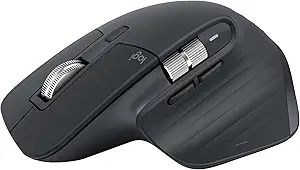
If I could recommend only one productivity mouse, this would be it.
The MX Master 3S consistently appears on professional desks for a reason. The ergonomic shape feels comfortable during long work sessions, and the thumb wheel becomes surprisingly useful once you start using it for horizontal scrolling in spreadsheets and editing software.
One feature I didn’t expect to love was the magnetic scroll wheel. It switches between precise scrolling and ultra-fast scrolling automatically. When reviewing long documents or reports, it saves a surprising amount of time.
Pros
- Extremely comfortable
- Excellent battery life
- Silent clicks
- Multi-device support
- Customizable buttons
Cons
- Expensive
- Large size isn’t ideal for travel
Budget Pick
Logitech Pebble Mouse 2 M350s

Not everyone needs a premium mouse.
The Pebble Mouse 2 offers a clean design, reliable performance, and impressive portability without costing a fortune.
I often carry one in a laptop bag because it’s lightweight and takes up almost no space. For students, remote workers, and casual office users, it’s hard to beat at this price.
Pros
- Affordable
- Lightweight
- Quiet clicks
- Great portability
Cons
- Limited advanced features
- Less ergonomic for long sessions
Premium Pick
Razer Pro Click
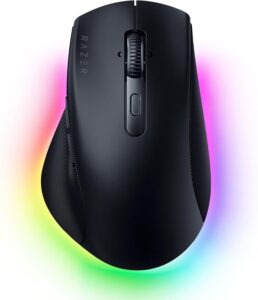
Many people associate Razer with gaming, but the Pro Click is built for productivity.
Its ergonomic design feels excellent during long workdays, and the sensor is incredibly precise. If you’re switching between design software, spreadsheets, and multiple monitors, the responsiveness stands out immediately.
Pros
- Premium build quality
- Excellent ergonomics
- Long battery life
- Multi-device support
Cons
- Higher price
- Larger footprint
Top Wireless Mice for Productivity in 2026
1. Logitech MX Master 3S
The gold standard for productivity mice.
The customizable buttons integrate well with apps like Photoshop, Excel, Google Sheets, and Adobe Premiere Pro. Once configured properly, repetitive tasks become noticeably faster.
Best For
Professionals, creators, and power users.
2. Logitech M720 Triathlon
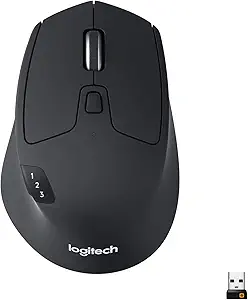
This mouse doesn’t get as much attention as the MX Master series, but it’s one of the most practical options available.
Its ability to switch between three devices instantly is incredibly useful if you work with a laptop, desktop, and tablet.
Best For
Multi-device workflows.
Pros
- Excellent battery life
- Comfortable shape
- Reliable performance
Cons
- Slightly dated design
3. Logitech Pebble Mouse 2 M350s
Minimalist, affordable, and travel-friendly.
It’s become a favorite among students and hybrid workers who want something simple and reliable.
Best For
Students and travelers.
4. Logitech Lift
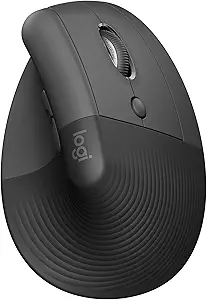
After developing occasional wrist discomfort from traditional mice, I tested several ergonomic models.
The Logitech Lift was the easiest adjustment.
Its vertical design places your hand in a more natural position, reducing strain during long work sessions.
Best For
People experiencing wrist fatigue.
Pros
- Comfortable ergonomic design
- Easy learning curve
- Great battery life
Cons
- Not ideal for everyone
- Requires adjustment period
5. Microsoft Surface Precision Mouse
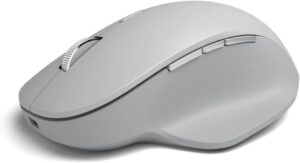
Microsoft built this mouse with productivity in mind.
The tracking is excellent, the build quality feels premium, and it integrates nicely into Windows workflows.
Best For
Office professionals and Windows users.
6. Razer Pro Click Mini
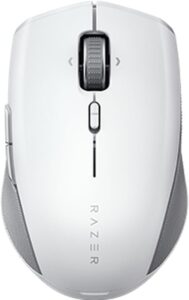
Frequent travelers often struggle to find a mouse that’s both compact and comfortable.
This model balances both surprisingly well.
Pros
- Compact size
- Portable
- Responsive sensor
Cons
- Smaller shape may not suit large hands
7. HP 710 Rechargeable Mouse
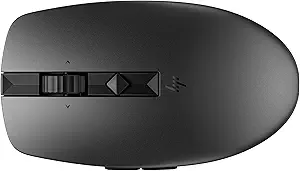
HP’s rechargeable productivity mouse is a solid option for office users.
The programmable buttons help automate repetitive tasks, and the rechargeable battery eliminates the need for replacements.
Best For
General productivity.
8. Dell Premier Rechargeable Mouse
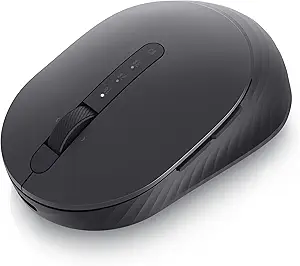
Dell designed this mouse primarily for professional environments.
The build quality feels premium, and the battery life is excellent.
Best For
Corporate and business users.
9. Logitech Signature M650
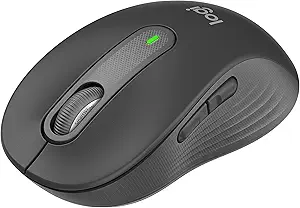
This is one of the easiest recommendations for everyday users.
It provides excellent comfort, silent clicks, and dependable performance at a reasonable price.
Pros
- Comfortable
- Quiet
- Affordable
Cons
- Fewer advanced features
10. Microsoft Bluetooth Ergonomic Mouse

Another strong ergonomic option for users spending long hours at a desk.
The shape encourages a more relaxed hand position while maintaining excellent control.
Best For
Comfort-focused productivity.
How to Choose the Right Productivity Mouse
When shopping for a wireless mouse, focus on features you’ll actually use.
Step 1: Consider Your Work Style
Ask yourself:
- Do you travel often?
- Do you work from a fixed desk?
- Do you use multiple monitors?
- Do you switch between devices?
Your answers narrow down the options quickly.
Step 2: Prioritize Comfort
A mouse that feels great for five minutes may feel terrible after five hours.
If possible, choose a shape designed for extended use.
Step 3: Check Battery Life
One lesson I learned the hard way: constantly charging a mouse becomes annoying fast.
Models offering weeks or months of battery life are worth considering.
Step 4: Evaluate Extra Buttons
Extra buttons can boost productivity significantly if you customize them properly.
For example:
- Copy and paste shortcuts
- Browser navigation
- Spreadsheet functions
- Application switching
Common Mistakes to Avoid
Buying Based Only on Looks
Some of the best-looking mice I’ve tried were surprisingly uncomfortable after long sessions.
Comfort matters more than appearance.
Ignoring Hand Size
A mouse that’s too small or too large can create discomfort quickly.
Always consider dimensions before buying.
Overpaying for Features You’ll Never Use
Many users don’t need advanced customization, gesture controls, or premium sensors.
Choose features that match your workflow.
Forgetting Multi-Device Support
If you use multiple computers, device switching can become a huge productivity boost.
Real-World Use Cases
For Remote Workers
The Logitech MX Master 3S remains the strongest all-around choice.
For Students
The Logitech Pebble Mouse 2 offers excellent value.
For Designers
The Razer Pro Click provides outstanding precision and comfort.
For Office Professionals
The Microsoft Surface Precision Mouse remains a reliable option.
For Ergonomic Comfort
The Logitech Lift is hard to beat.
Frequently Asked Questions
What is the best wireless mouse for productivity in 2026?
The Logitech MX Master 3S remains the best overall productivity mouse thanks to its comfort, battery life, customization options, and multi-device support.
Are expensive wireless mice worth it?
If you spend several hours daily on a computer, premium models often provide better comfort, durability, and workflow-enhancing features that justify the cost.
Is Bluetooth or a USB receiver better?
Both work well. Bluetooth reduces clutter, while USB receivers often provide slightly more stable connections.
How long should a wireless mouse last?
A quality productivity mouse typically lasts between three and five years, often much longer with proper care.
Do ergonomic mice actually help?
Many users experience reduced wrist and hand strain when switching to an ergonomic mouse, especially during extended work sessions.
Final Recommendation
After testing and using various productivity mice over the years, the Logitech MX Master 3S remains the most complete package for most people. It combines comfort, customization, reliability, and battery life better than almost anything else on the market.
If you’re looking to save money, the Logitech Pebble Mouse 2 delivers excellent value without sacrificing everyday usability.
For users who want a premium experience and spend long hours at a desk, the Razer Pro Click is a fantastic alternative.
The best mouse is ultimately the one that fits your workflow and feels comfortable after a full day of work. That’s the feature that matters most when productivity is the goal.