A few years ago, my desk was a mess.
I had charging cables tangled around my keyboard, sticky notes covering my monitor, and a phone constantly running out of battery at the worst possible moment. I spent more time looking for things than actually getting work done.
The funny part? I thought buying a bigger desk would solve the problem.
It didn’t.
What actually transformed my workspace was adding a few smart desk accessories that made everyday tasks easier. Some saved time, some reduced clutter, and a few completely changed how I worked.
After testing dozens of gadgets over the years for work, studying, and content creation, I’ve narrowed down the smart desk accessories that genuinely improve a modern setup.
Whether you’re building a home office, upgrading a study desk, or creating a productivity-focused workspace, these are the accessories worth considering.
Quick Comparison Table
| Product | Best For | Price Range |
|---|---|---|
| Logitech MX Master 3S | Overall Productivity | $$$ |
| Anker MagGo Wireless Charger | Phone Charging | $$ |
| BenQ ScreenBar Halo | Desk Lighting | $$$ |
| Elgato Stream Deck MK.2 | Workflow Automation | $$$ |
| Orbitkey Desk Mat | Organization | $$ |
| Echo Show 8 | Smart Assistant | $$$ |
| Twelve South Curve Flex | Laptop Users | $$ |
| Govee Smart Light Bars | Desk Ambiance | $$ |
| UGREEN USB-C Docking Station | Connectivity | $$ |
| Xiaomi Smart Clock | Budget Smart Display | $ |
Best Overall Pick
Logitech MX Master 3S
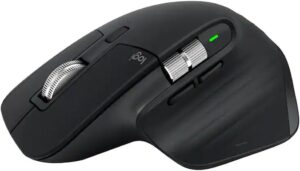
If I could keep only one smart desk accessory, this would be it.
The MX Master 3S isn’t just a mouse. It becomes a productivity tool once you start using features like app-specific shortcuts and multi-device switching.
I regularly switch between a laptop and desktop. Being able to move between devices without reconnecting anything saves a surprising amount of time every day.
Pros
- Excellent ergonomics
- Silent clicks
- Multi-device support
- Long battery life
- Customizable shortcuts
Cons
- Premium price
- Slightly heavy for travel
Best Budget Pick
Xiaomi Smart Clock
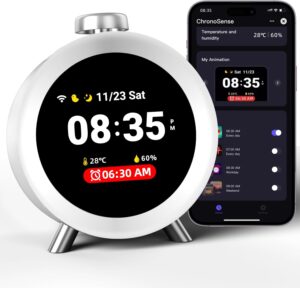
Not every smart desk upgrade needs to cost a fortune.
This compact smart display provides weather updates, timers, alarms, calendar information, and smart home controls without taking up much space.
For students and remote workers, it’s one of the easiest ways to add smart functionality to a desk setup.
Pros
- Affordable
- Compact design
- Google Assistant support
- Useful daily information
Cons
- Small display
- Basic speaker quality
Best Premium Pick
BenQ ScreenBar Halo
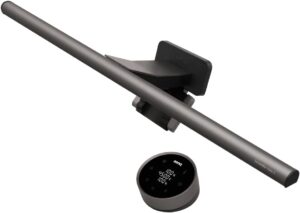
I originally thought monitor lights were unnecessary.
Then I spent several weeks using one.
The difference during late-night work sessions was immediate. Eye strain decreased, and the desk looked cleaner because I no longer needed a bulky lamp.
The ScreenBar Halo automatically adjusts brightness and creates a much more comfortable workspace.
Pros
- Excellent lighting quality
- Reduces eye fatigue
- Saves desk space
- Premium build
Cons
- Expensive
- Mainly beneficial for monitor users
1. Logitech MX Master 3S
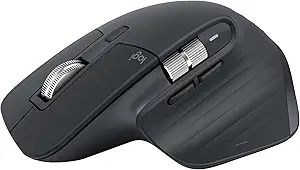
A productivity-focused mouse that feels like an upgrade every time you use it.
The gesture controls, horizontal scrolling wheel, and customization options make repetitive tasks much faster.
Best For
Professionals, students, designers, and content creators.
Pros
- Comfortable design
- Highly customizable
- Excellent battery life
Cons
- Premium pricing
2. Anker MagGo Wireless Charging Stand
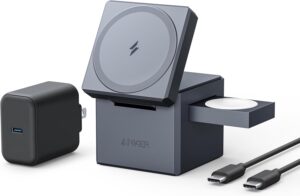
One of the easiest ways to eliminate cable clutter.
Instead of searching for charging cables, I simply place my phone on the stand while working.
It keeps the screen visible for notifications and video calls.
Pros
- Fast wireless charging
- Clean desk appearance
- Reliable performance
Cons
- Works best with MagSafe-compatible devices
3. BenQ ScreenBar Halo
Proper lighting changes everything.
Many people focus on keyboards and monitors while ignoring lighting, but lighting often has a bigger impact on comfort.
Pros
- Space-saving design
- Adjustable brightness
- Great for long work sessions
Cons
- Premium cost
4. Elgato Stream Deck MK.2
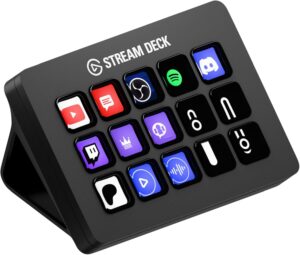
At first, I thought this device was only for streamers.
I was wrong.
You can program buttons to launch apps, open folders, start meetings, control music, manage smart lights, and automate repetitive tasks.
Pros
- Massive productivity potential
- Easy customization
- Works with many apps
Cons
- Learning curve initially
5. Orbitkey Desk Mat

A desk mat may not sound smart, but the built-in cable management and organization features make a noticeable difference.
The hidden storage compartment is surprisingly useful.
Pros
- Keeps workspace organized
- Premium materials
- Cable management system
Cons
- Limited color options
6. Echo Show 8
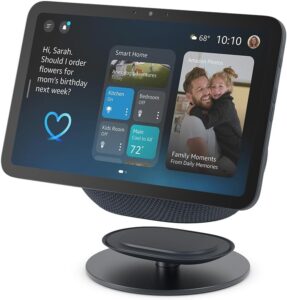
Having a smart assistant on your desk can reduce interruptions.
I often use it to set reminders, check weather forecasts, control smart lights, and quickly ask questions without reaching for my phone.
Pros
- Smart assistant integration
- Useful display
- Video calling support
Cons
- Requires desk space
7. Twelve South Curve Flex
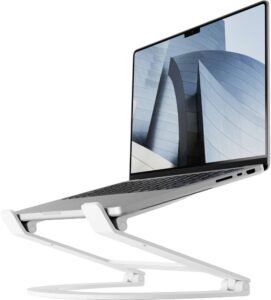
Laptop users often underestimate the value of a proper stand.
Raising the screen to eye level significantly improves posture and reduces neck strain.
Pros
- Adjustable height
- Portable
- Strong build quality
Cons
- Not necessary for desktop users
8. Govee Smart Light Bars
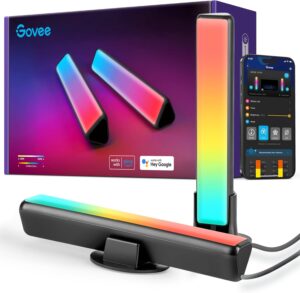
Good lighting isn’t only about productivity.
Sometimes it’s about creating an environment you enjoy spending time in.
These light bars add ambient lighting behind monitors and can sync with music or screen content.
Pros
- Easy setup
- Smart app controls
- Improves desk aesthetics
Cons
- More aesthetic than essential
9. UGREEN USB-C Docking Station
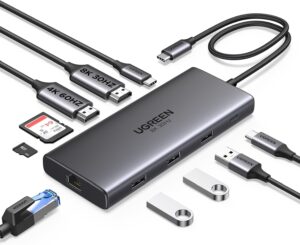
Modern laptops often lack ports.
Instead of plugging and unplugging accessories all day, a docking station connects everything through a single cable.
Pros
- Expands connectivity
- Cleaner setup
- Supports multiple peripherals
Cons
- Features vary by model
10. Xiaomi Smart Clock
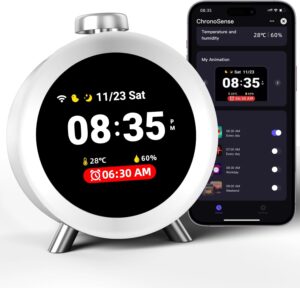
This simple gadget adds surprising convenience.
Having quick access to time, weather, alarms, and reminders reduces the need to constantly check your phone.
Pros
- Affordable
- Compact footprint
- Useful smart features
Cons
- Basic display quality
How to Build a Smart Desk Setup Step by Step
If you’re starting from scratch, don’t buy everything at once.
Here’s the order I’d recommend:
Step 1: Improve Ergonomics
Start with:
- Mouse
- Laptop stand
- Proper lighting
These upgrades directly affect comfort.
Step 2: Remove Cable Clutter
Add:
- Wireless charger
- Docking station
- Cable management accessories
A cleaner desk feels more productive.
Step 3: Automate Small Tasks
Introduce:
- Smart display
- Stream Deck
- Voice assistant
These save time throughout the day.
Step 4: Enhance Your Environment
Finally add:
- Smart lighting
- Desk decor
- Ambient accessories
This makes your workspace more enjoyable.
Common Mistakes to Avoid
Buying Gadgets Before Solving Problems
A smart accessory should solve a real issue.
Don’t buy something simply because it looks cool on social media.
Ignoring Ergonomics
Fancy lighting won’t help if you’re getting neck pain from poor monitor positioning.
Comfort comes first.
Overloading the Desk
I’ve made this mistake.
Adding too many accessories can actually create distractions.
Choose tools you genuinely use.
Forgetting Cable Management
Even smart devices create clutter if cables aren’t organized.
A few cable clips and organizers can make a huge difference.
Real-World Setup Examples
Student Setup
- Xiaomi Smart Clock
- Wireless charger
- Laptop stand
- Desk lamp
Affordable and practical.
Remote Worker Setup
- MX Master 3S
- BenQ ScreenBar Halo
- Docking station
- Echo Show 8
Excellent for productivity and comfort.
Content Creator Setup
- Stream Deck MK.2
- Smart lighting
- Wireless charging stand
- Docking station
Ideal for managing multiple tools and workflows.
Frequently Asked Questions
Are smart desk accessories worth it?
The right ones are. Accessories that improve comfort, organization, or workflow often provide daily value.
What should I buy first?
A quality mouse, proper lighting, and a laptop stand usually provide the biggest immediate improvements.
Do smart desk gadgets increase productivity?
Some do. Devices that automate tasks, reduce clutter, or improve ergonomics can save time and help maintain focus.
What’s the best smart accessory for small desks?
A wireless charging stand or monitor light bar offers excellent functionality without using much space.
Are expensive accessories always better?
Not necessarily. Many affordable accessories provide similar benefits. Focus on solving specific problems rather than chasing premium products.
Final Recommendation
If you’re building a modern desk setup, start with practical upgrades rather than flashy gadgets.
For most people, the Logitech MX Master 3S delivers the biggest productivity boost, making it the strongest overall recommendation. If you’re on a budget, the Xiaomi Smart Clock adds useful smart features without spending much. For users willing to invest in a premium workspace, the BenQ ScreenBar Halo is one of the most noticeable quality-of-life upgrades available.
The best smart desk setup isn’t the one with the most gadgets. It’s the one that helps you work comfortably, stay organized, and spend less time dealing with distractions.