
Introduction
A few years ago, I thought productivity was all about finding the perfect app. I downloaded task managers, note-taking software, and focus timers. Some helped, but my desk still felt cluttered, uncomfortable, and distracting.
The real change happened when I started adding a few small electronics to my workspace. Not expensive gadgets or flashy tech—just compact devices that solved everyday annoyances.
One gadget reduced cable clutter. Another made video calls look professional. A simple monitor light helped me work longer without eye strain. These small upgrades made a surprisingly big difference.
If you work from home, study online, or spend hours at a desk, the right electronics can improve comfort, organization, and focus without taking up much space.
This guide covers some of the best small desk electronics for productivity, including their pros, cons, and real-world use cases.
Quick Comparison Table
| Product | Best For | Size | Key Benefit |
|---|---|---|---|
| Logitech MX Anywhere 3S | Portable productivity | Compact | Precise tracking anywhere |
| BenQ ScreenBar | Eye comfort | Slim | Better lighting without desk clutter |
| Anker 7-in-1 USB-C Hub | Connectivity | Pocket-sized | Expands laptop ports |
| Elgato Stream Deck Mini | Workflow automation | Small | One-touch shortcuts |
| Jabra Speak 510 | Meetings & calls | Compact | Clear conference audio |
| Echo Pop | Voice assistance | Small | Hands-free reminders and timers |
| Anker Wireless Charging Pad | Phone charging | Minimal | Keeps phone powered without cables |
1. Logitech MX Anywhere 3S

The first productivity gadget that genuinely improved my workflow was a good wireless mouse.
Many people use whatever mouse came with their computer, but upgrading to a compact productivity mouse can make everyday work much smoother.
The Logitech MX Anywhere 3S tracks on almost any surface, including glass desks. The scrolling is fast yet precise, making it great for spreadsheets, research, and multitasking.
Pros
- Compact and travel-friendly
- Works on multiple devices
- Excellent battery life
- Precise tracking
Cons
- More expensive than basic mice
- Smaller size may not suit large hands
Best For
Remote workers, students, and anyone who frequently switches between devices.
2. BenQ ScreenBar
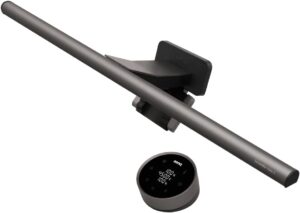
One mistake I made for years was working under poor lighting.
I didn’t realize how much eye strain was affecting my focus until I added a monitor light bar. Unlike a desk lamp, the BenQ ScreenBar sits on top of the monitor and shines light directly onto the workspace without creating screen glare.
The result is a cleaner desk and noticeably less eye fatigue during long work sessions.
Pros
- Saves desk space
- Reduces eye strain
- Easy installation
- Adjustable brightness
Cons
- Higher price than regular desk lamps
- Works best with standard monitor designs
Best For
People who work late evenings or spend several hours in front of a screen.
3. Anker 7-in-1 USB-C Hub

Modern laptops are becoming thinner, but they often sacrifice ports.
If you’ve ever unplugged one device just to connect another, you know how frustrating it can be.
A USB-C hub solves that problem instantly.
The Anker 7-in-1 USB-C Hub typically adds:
- USB-A ports
- HDMI output
- SD card reader
- USB-C charging support
Instead of crawling under the desk searching for cables, everything stays accessible.
Pros
- Expands connectivity
- Compact design
- Reliable performance
- Great for laptops
Cons
- Can become warm during heavy use
- Occupies one USB-C port
Best For
Laptop users, content creators, and remote workers.
4. Elgato Stream Deck Mini

At first, I assumed this gadget was only for streamers.
After using one, I realized it’s a productivity tool disguised as a streaming accessory.
The Stream Deck Mini lets you create custom buttons for repetitive tasks.
For example:
- Open multiple work apps
- Launch browser tabs
- Start Zoom meetings
- Control music
- Trigger shortcuts
Instead of repeating the same clicks every day, one button does the work.
Pros
- Saves time on repetitive tasks
- Easy customization
- Small footprint
- Works with many apps
Cons
- Requires setup time
- Not essential for casual users
Best For
Power users, marketers, developers, and content creators.
5. Jabra Speak 510

Poor audio can ruin meetings.
I’ve seen people spend hundreds on webcams while using a laptop microphone that sounds distant and echo-filled.
The Jabra Speak 510 is a compact speakerphone designed for video calls and conference meetings.
It improves both incoming and outgoing audio quality, making conversations clearer and more professional.
Pros
- Excellent call quality
- Portable design
- Simple setup
- Works with major meeting platforms
Cons
- Not necessary for solo workers who rarely take calls
- Higher cost than basic speakers
Best For
Remote teams, freelancers, and professionals who attend frequent meetings.
6. Echo Pop

A surprising productivity helper is a smart speaker.
The Echo Pop doesn’t directly make you work faster, but it removes small interruptions throughout the day.
You can use voice commands to:
- Set timers
- Create reminders
- Check weather updates
- Manage shopping lists
- Control smart devices
During focused work sessions, not having to pick up your phone helps reduce distractions.
Pros
- Affordable
- Hands-free operation
- Compact size
- Useful daily reminders
Cons
- Requires internet connection
- Privacy concerns for some users
Best For
Home office workers and multitaskers.
7. Anker Wireless Charging Pad

One of the simplest productivity upgrades is also one of the cheapest.
A wireless charging pad eliminates the constant hunt for charging cables.
Whenever you sit down, place your phone on the pad and it starts charging automatically.
This small habit helps ensure your phone stays powered throughout the day while keeping your desk tidy.
Pros
- Reduces cable clutter
- Easy to use
- Affordable
- Minimalist design
Cons
- Slower than some wired chargers
- Requires compatible devices
Best For
Anyone looking for a cleaner workspace.
How to Choose the Right Desk Electronics
Not every gadget improves productivity.
Before buying anything, ask yourself these questions:
Step 1: Identify Your Biggest Frustration
Is it:
- Cable clutter?
- Poor lighting?
- Too many meetings?
- Limited laptop ports?
- Repetitive tasks?
Start by solving the biggest problem first.
Step 2: Measure Available Space
Small desks can become crowded quickly.
Choose electronics that:
- Mount to existing equipment
- Fold away easily
- Serve multiple purposes
Step 3: Prioritize Daily Use
The best productivity gadget is one you’ll use every day.
A device that saves 30 seconds dozens of times per day often provides more value than an expensive gadget used once a week.
Step 4: Avoid Buying for Aesthetics Alone
Many desk gadgets look impressive online but add little practical value.
Focus on function first and appearance second.
Common Mistakes to Avoid
Buying Too Many Gadgets at Once
It’s easy to create a cluttered workspace by adding every trending accessory.
Start small and upgrade gradually.
Ignoring Ergonomics
A productivity gadget won’t help much if your monitor height, chair position, and keyboard setup are uncomfortable.
Chasing Trends
Social media often promotes gadgets that look cool but provide little real benefit.
Read reviews and consider your actual workflow.
Overlooking Cable Management
Even great electronics can create visual clutter if cables are everywhere.
Use cable clips, trays, or sleeves to keep things organized.
Real-World Productivity Setup Example
If I were building a compact productivity desk today, I would start with:
- Logitech MX Anywhere 3S
- BenQ ScreenBar
- Anker USB-C Hub
- Wireless charging pad
These four devices solve the most common desk problems:
- Better navigation
- Better lighting
- Better connectivity
- Better organization
They require very little desk space while delivering noticeable daily benefits.
Frequently Asked Questions
Are desk gadgets really worth buying?
Yes, if they solve a specific problem. The best productivity gadgets remove small frustrations that interrupt your workflow.
What is the most useful small desk electronic?
For most people, a quality wireless mouse or USB-C hub offers the biggest productivity improvement for the cost.
Do wireless chargers improve productivity?
Indirectly, yes. They reduce cable clutter and help keep devices charged throughout the workday.
What gadget helps reduce eye strain?
A monitor light bar such as the BenQ ScreenBar can significantly improve desk lighting and reduce eye fatigue.
How much should I spend on desk electronics?
Start with one or two devices that solve your biggest problems. Even a budget of $50–$100 can noticeably improve a workspace.
Final Recommendation
After trying various desk accessories over the years, I’ve found that the best productivity electronics are the ones you barely notice because they quietly remove everyday frustrations.
If you’re starting from scratch, prioritize a quality wireless mouse, a USB-C hub, and a monitor light bar. These three upgrades deliver immediate benefits without taking up much desk space.
Remember, productivity isn’t about filling your desk with gadgets. It’s about creating an environment where work feels smoother, distractions are reduced, and your tools stay out of the way so you can focus on what matters most.