
Introduction
A few years ago, I thought feeling tired after a long day at my desk was completely normal. My shoulders felt tight, my lower back ached, and by evening, my wrists would sometimes feel stiff from typing.
At first, I blamed work itself. Then I realized the problem wasn’t the workload—it was my desk setup.
I didn’t need an expensive office makeover. Small ergonomic upgrades made a huge difference. A monitor stand improved my posture, a wrist rest reduced strain, and an adjustable footrest made long sitting sessions much more comfortable.
If you spend several hours each day working, studying, gaming, or creating content, ergonomic desk accessories can help reduce discomfort and improve productivity. The best part is that many of them are affordable and easy to add to your existing setup.
This guide covers some of the best ergonomic desk accessories I’ve found useful, along with their pros, cons, and practical use cases.
Quick Comparison Table
| Product | Best For | Key Benefit | Price Range |
|---|---|---|---|
| Adjustable Footrest | Lower body comfort | Improves sitting posture | $$ |
| Ergonomic Keyboard Wrist Rest | Typing comfort | Reduces wrist pressure | $ |
| Vertical Mouse | Wrist strain | Natural hand position | $$ |
| Monitor Stand | Neck comfort | Raises screen to eye level | $ |
| Laptop Stand | Remote workers | Better viewing angle | $$ |
| Seat Cushion | Long sitting sessions | Extra support and comfort | $$ |
| Desk Lamp with Adjustable Arm | Eye comfort | Better lighting and less strain | $$ |
1. Adjustable Footrest

One accessory I underestimated for years was a footrest.
My chair was slightly too high, and my feet didn’t sit comfortably on the floor. I constantly shifted positions throughout the day without realizing why.
An adjustable footrest solved that issue almost immediately.
Pros
- Encourages better posture
- Reduces pressure on legs
- Improves circulation during long work sessions
- Adjustable angles for different users
Cons
- Takes up floor space
- Some budget models may slide around
Best For
People whose feet don’t rest comfortably on the floor when seated.
2. Ergonomic Keyboard Wrist Rest

Many people unknowingly bend their wrists upward while typing.
I used to experience mild wrist fatigue after several hours of writing articles and responding to emails. Adding a memory foam wrist rest helped keep my hands in a more neutral position.
Pros
- Comfortable support while typing
- Affordable upgrade
- Helps maintain natural wrist alignment
- Easy to use with any keyboard
Cons
- Needs occasional cleaning
- Cheap versions may flatten over time
Best For
Writers, programmers, students, and office workers.
3. Vertical Mouse

Switching to a vertical mouse felt strange for the first few days.
After about a week, I noticed my wrist felt less tense, especially during long editing sessions.
Unlike traditional mice, vertical models keep your hand in a handshake-like position, reducing forearm rotation.
Pros
- More natural hand position
- Can reduce wrist strain
- Comfortable for long sessions
- Available in wired and wireless versions
Cons
- Learning curve at first
- Not ideal for everyone
Best For
Anyone experiencing wrist discomfort from regular mouse use.
4. Monitor Stand

One of the biggest posture mistakes people make is looking down at their screen all day.
I used to stack random books under my monitor before finally buying a proper monitor stand.
The difference was noticeable almost immediately.
Pros
- Brings screen closer to eye level
- Helps reduce neck strain
- Creates extra storage underneath
- Affordable and simple
Cons
- Limited height adjustment on basic models
- Not suitable for every monitor size
Best For
Desktop users and anyone who frequently experiences neck tension.
5. Laptop Stand
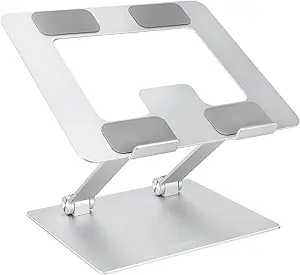
Laptop screens are usually too low for comfortable long-term use.
Without a stand, you’re constantly tilting your head downward.
A laptop stand raises the screen and encourages better posture, especially when paired with an external keyboard and mouse.
Pros
- Improves screen height
- Better airflow for laptop cooling
- Portable and lightweight
- Great for hybrid work setups
Cons
- Often requires external accessories for best results
- Some models wobble slightly
Best For
Remote workers, students, and digital nomads.
6. Ergonomic Seat Cushion

I never understood why office chairs felt uncomfortable after a few hours until I tried a quality memory foam seat cushion.
Even decent office chairs can benefit from additional support.
Pros
- Adds comfort to existing chairs
- Reduces pressure points
- Helpful during long sitting sessions
- Portable between home and office
Cons
- May increase seat height
- Memory foam quality varies
Best For
Anyone sitting for more than four hours daily.
7. Adjustable Desk Lamp

Ergonomics isn’t just about posture.
Eye strain can be just as exhausting as back pain.
I noticed fewer headaches after upgrading from a basic room light to an adjustable desk lamp with brightness controls.
Pros
- Reduces eye strain
- Improves focus
- Adjustable brightness settings
- Useful for reading and detailed work
Cons
- Premium models can be expensive
- Requires desk space
Best For
People working during evenings or in low-light rooms.
How to Build an Ergonomic Desk Setup Step by Step
If you’re starting from scratch, here’s the order I recommend:
Step 1: Fix Screen Height
Raise your monitor or laptop screen so the top portion sits near eye level.
Step 2: Improve Seating
Add a seat cushion or adjust chair height properly.
Step 3: Support Your Wrists
Use a wrist rest and ensure your forearms remain roughly parallel to the desk.
Step 4: Consider a Better Mouse
If wrist discomfort is common, try a vertical mouse.
Step 5: Add a Footrest
Use one if your feet don’t sit naturally on the floor.
Step 6: Upgrade Lighting
Reduce eye fatigue with an adjustable desk lamp.
Common Ergonomic Mistakes to Avoid
Buying Everything at Once
Many people spend a lot of money before identifying their actual discomfort points.
Start with the biggest problem first.
Ignoring Monitor Height
A perfect chair won’t help if you’re constantly looking down.
Using Wrist Rests Incorrectly
Your wrists shouldn’t press heavily into the pad while typing. The rest is mainly for pauses between typing sessions.
Sitting Too Long
Even the best ergonomic accessories can’t replace movement.
Try standing, stretching, or walking briefly every hour.
Choosing Style Over Comfort
Some accessories look great on social media but provide little ergonomic benefit.
Always prioritize comfort and adjustability.
Real-World Example
A friend who works remotely complained about constant neck pain despite owning an expensive office chair.
After checking his setup, the problem was obvious: his laptop sat directly on the desk.
A simple laptop stand and external keyboard solved most of the issue within a couple of weeks.
This experience reminded me that ergonomics is often about positioning rather than spending huge amounts of money.
Frequently Asked Questions
Are ergonomic desk accessories worth it?
Yes. Even small improvements can reduce discomfort and improve posture during long work sessions.
What is the most important ergonomic desk accessory?
For most people, a monitor stand or laptop stand provides the biggest immediate improvement because screen height directly affects posture.
Do vertical mice really help?
Many users report reduced wrist strain because the hand stays in a more natural position. However, comfort varies from person to person.
How much should I spend on ergonomic accessories?
You can significantly improve your setup for under $100 by prioritizing essentials like a monitor stand, wrist rest, and footrest.
Can ergonomic accessories improve productivity?
They can help by reducing discomfort and distractions, making it easier to stay focused throughout the day.
Final Recommendation
If you’re only buying one ergonomic accessory this year, start with a monitor stand or laptop stand. Improving screen height often provides the fastest improvement in posture and comfort.
After that, consider a wrist rest, footrest, or vertical mouse depending on where you experience the most discomfort.
The biggest lesson I learned is that comfort isn’t about creating a perfect Instagram-worthy workspace. It’s about making small changes that help your body feel better after hours of work.
Your future self will appreciate those upgrades every single day.