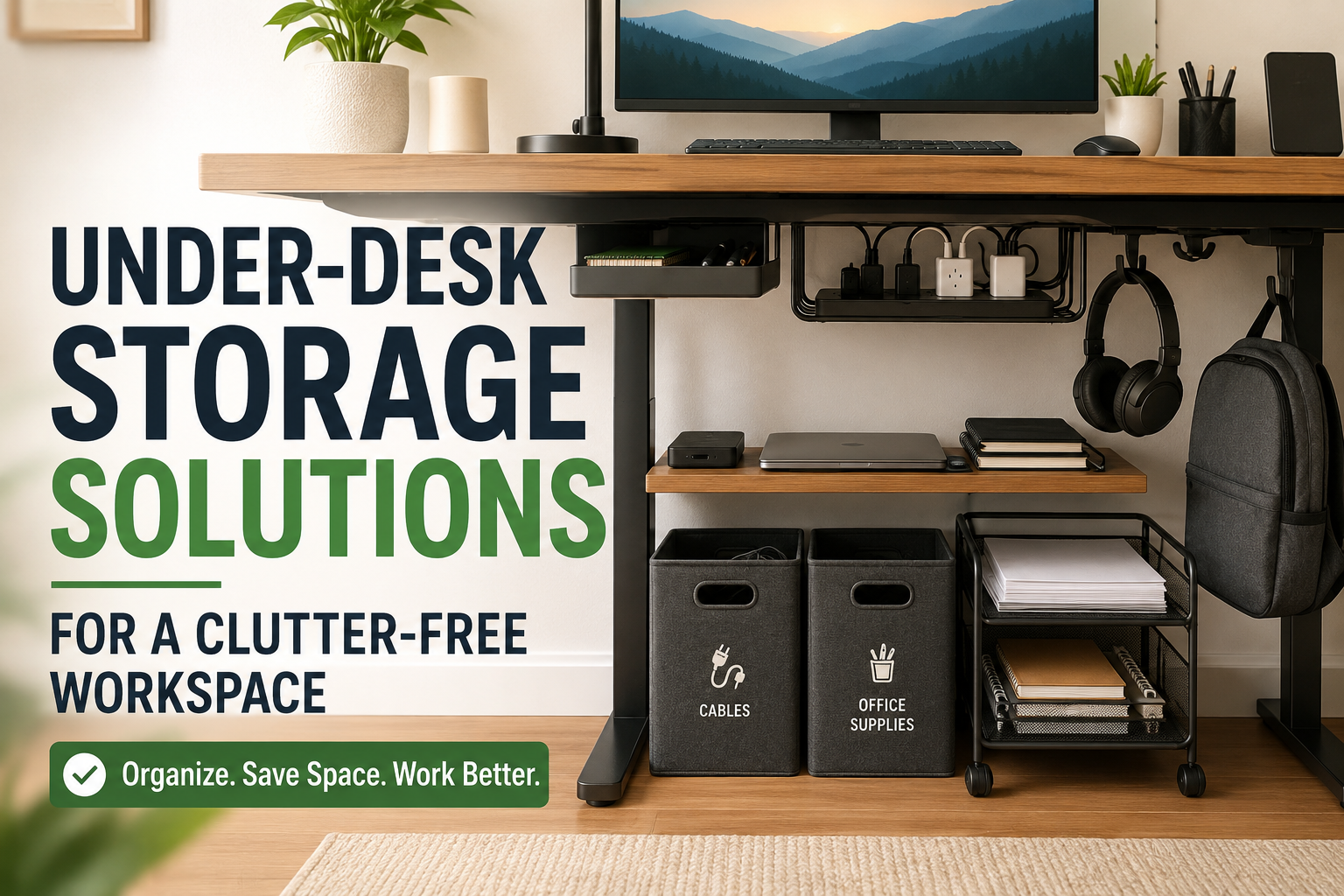
A few months ago, I reached the point where I couldn’t find a pen on my own desk.
It wasn’t because I owned too many things. The problem was that everything had slowly collected underneath the desk instead of on top of it. There were tangled charging cables, an extra keyboard, unopened notebooks, a power strip, random adapters, and even a pair of headphones that somehow disappeared for weeks.
Every time I stretched my legs, I bumped into something.
I kept thinking I needed a bigger desk, but after trying a few simple under-desk storage ideas, I realized space wasn’t the problem. I simply wasn’t using the empty area beneath the desk effectively.
If your workspace feels crowded even after cleaning it regularly, under-desk storage can completely change how your office feels without taking up extra room. Whether you work from home, study, or spend hours gaming, organizing the space below your desk makes the entire setup feel cleaner and more comfortable.
Why Under-Desk Storage Makes Such a Big Difference
Most desks leave a surprising amount of unused space underneath. We usually treat it as a dumping ground for cables, boxes, or anything we don’t want sitting on top.
The problem is that clutter underneath eventually affects the entire workspace.
You spend more time searching for things.
Your feet have nowhere comfortable to rest.
Dust builds up faster.
Cleaning becomes frustrating.
Once I cleared the floor and gave every item a dedicated place, my desk immediately felt larger even though I hadn’t removed much from the room.
Start by Removing Everything
Before buying organizers or storage products, pull everything out from under the desk.
This step surprised me because I discovered several things I had completely forgotten about:
- Old charging cables
- Empty product boxes
- Broken USB hubs
- Duplicate notebooks
- Unused mouse pads
- Random office supplies
Sort everything into three piles:
- Keep
- Throw away
- Store somewhere else
Only organize the items you actually need within arm’s reach.
Use Under-Desk Drawers
If your desk doesn’t have built-in drawers, adhesive under-desk drawers are one of the easiest upgrades.
These slim drawers attach beneath the desktop and stay hidden while providing space for small everyday items.
They’re perfect for storing:
- Pens
- Sticky notes
- USB drives
- Chargers
- Earbuds
- Flash drives
- Small tools
- Memory cards
I installed one beneath the right side of my desk, and it’s now the first place I check whenever I need office supplies.
Install an Under-Desk Shelf
Some items don’t belong on the desktop but are used regularly.
An under-desk shelf creates extra storage without reducing legroom if it’s installed toward the back.
Good items to keep there include:
- Laptop dock
- External hard drive
- Small notebook
- Tablet
- Document folders
- Portable SSD
- Camera accessories
Because everything sits above the floor, cleaning underneath becomes much easier.
Organize Cable Clutter
Cable management made the biggest visual difference in my workspace.
Before organizing them, my power strip sat on the floor surrounded by charging bricks and tangled wires.
Now almost everything is hidden.
A simple cable management setup includes:
- Cable tray mounted beneath the desk
- Velcro cable ties
- Adhesive cable clips
- Cable sleeves
- Under-desk power strip holder
Instead of hanging loosely, every cable follows a clean route.
Not only does the desk look better, but vacuuming also takes half the time.
Rolling Storage Carts Work Surprisingly Well
If you have a wider desk, a slim rolling cart can slide underneath when not in use.
This works especially well for people who keep lots of office supplies nearby.
A rolling cart can hold:
- Printer paper
- Journals
- Craft supplies
- Camera gear
- Hard drives
- Office stationery
- Books
The biggest advantage is flexibility.
When working on a project, simply roll it beside the desk instead of constantly getting up.
Use Storage Baskets for Larger Items
Not everything needs expensive organizers.
Simple fabric or plastic storage baskets keep bulky items together.
I use one basket for electronics and another for office supplies.
Inside one basket you’ll find:
- Spare keyboard
- Mouse
- HDMI cables
- Chargers
- USB hubs
Instead of everything spreading across the floor, each category stays together.
Add Hooks Under the Desk
One of the cheapest upgrades I made cost only a few dollars.
Self-adhesive hooks mounted underneath the desk now hold:
- Headphones
- Backpack
- Cable loops
- Reusable shopping bag
Before adding the hooks, my headphones constantly ended up buried beneath papers or hanging from the monitor.
Now they always have a home.
Make Use of Vertical Space
People often think only about the floor underneath the desk.
The sides are useful too.
Attach slim organizers or hanging pockets to the desk frame for:
- Notebooks
- Tablets
- Planners
- Charging cables
Using vertical space keeps frequently used items within easy reach while leaving your desktop clean.
Label Storage Containers
This sounds unnecessary until you have multiple containers.
Without labels, you’ll eventually open every basket looking for one charger.
Simple labels like:
- Cables
- Camera Gear
- Office Supplies
- Tech Accessories
- Documents
save time every single week.
Don’t Forget Your Legroom
One mistake I made early on was filling every available inch beneath the desk.
It looked organized, but sitting comfortably became impossible.
Leave the center area completely open whenever possible.
Store items toward the back or sides instead.
Comfort should always come before storage.
Best Items to Store Under a Desk
Not everything belongs underneath.
These items work especially well:
- Laptop dock
- External SSD
- Chargers
- Headphones
- Office supplies
- Printer paper
- Documents
- Small printer
- Camera accessories
- Power strip
- Notebook collection
Avoid storing frequently used drinks, food, or anything that leaks.
Storage Ideas for Small Home Offices
Small rooms benefit the most from under-desk organization.
If you’re working from a bedroom or apartment, every square foot matters.
A combination like this works well:
- One under-desk drawer
- Cable tray
- Two storage baskets
- Headphone hook
- Slim rolling cart
This setup adds a surprising amount of storage without making the room feel crowded.
Storage Ideas for Standing Desks
Standing desks need a little extra planning because everything moves up and down.
Heavy boxes on the floor can interfere with the desk frame.
Instead, choose:
- Mounted cable trays
- Lightweight drawers
- Desk-mounted organizers
- Flexible cable sleeves
Always leave enough slack in cables so they move smoothly with the desk.
Mistakes That Create More Clutter
I’ve made nearly every organizing mistake possible.
Here are the biggest ones to avoid.
Buying Organizers Before Decluttering
It’s tempting to order storage boxes immediately.
But if half the items are unnecessary, you’ll simply organize clutter instead of removing it.
Ignoring Cable Management
Even a perfectly clean desk looks messy when cables hang everywhere.
Spend thirty minutes organizing them once, and you’ll notice the difference every day.
Filling Every Empty Space
Just because there’s room underneath doesn’t mean it should all be used.
A little empty space makes the area feel cleaner.
Mixing Everything Together
Throwing chargers, pens, adapters, notebooks, and batteries into one basket creates frustration later.
Group similar items together.
Future you will appreciate it.
A Simple Weekend Organization Plan
You don’t need to spend an entire day reorganizing your workspace.
Here’s the process I recommend.
Step 1: Empty everything from beneath the desk.
Step 2: Throw away broken or unnecessary items.
Step 3: Sort what’s left into categories.
Step 4: Mount a cable tray or organize cables.
Step 5: Install an under-desk drawer if needed.
Step 6: Add hooks for headphones or bags.
Step 7: Place baskets toward the back corners.
Step 8: Keep the center clear for comfortable legroom.
The entire process usually takes less than two hours.
Is Expensive Storage Worth It?
Not necessarily.
Some of my favorite organization tools were inexpensive.
A few adhesive hooks, reusable cable ties, and storage baskets solved most of my problems.
Higher-end accessories certainly look nicer, but organization comes more from having a system than buying premium products.
Start with simple solutions and only upgrade when you know exactly what your workspace needs.
Final Thoughts
A clutter-free workspace isn’t created by owning less—it’s created by giving everything a proper place.
The area beneath your desk is easy to overlook, yet it’s one of the most valuable storage spaces in any home office. Once I stopped treating it like a place to hide random items and started organizing it intentionally, my desk became easier to clean, more comfortable to use, and far less stressful to work at.
You don’t need a complete office makeover to see results. Even adding a cable tray, a small drawer, or a couple of storage baskets can make your workspace feel noticeably calmer. Start with one improvement, see what works for your routine, and build from there. Small changes underneath your desk often have a bigger impact than buying an entirely new one.