A few years ago, I thought working from home would automatically make me more productive. No commute, fewer interruptions, and the comfort of my own space sounded perfect.
The reality was different.
I found myself constantly getting distracted, dealing with cable clutter, adjusting my chair every few minutes, and wasting time on small annoyances that added up throughout the day. It wasn’t that I wasn’t working hard—it was that my workspace was working against me.
Over time, I started testing different gadgets and desk accessories to solve these problems. Some purchases ended up collecting dust in a drawer, while others became things I use every single day.
If you’re building a home office or trying to improve your current setup, these are the productivity gadgets that made the biggest difference for me.
Why Productivity Gadgets Matter
Many people think productivity is all about time management apps or better discipline.
From my experience, productivity is often about removing friction.
If your phone keeps distracting you, you’ll lose focus.
If your desk is uncomfortable, you’ll take more breaks.
If your lighting strains your eyes, you’ll get tired faster.
The right gadgets don’t magically make you productive. They simply make it easier to stay focused and comfortable for longer periods.
Let’s look at some of the best options.
1. A Quality Monitor Light Bar
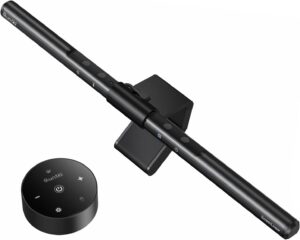
One of the most underrated upgrades I ever made was adding a monitor light bar.
Unlike a traditional desk lamp, a monitor light bar sits on top of your screen and shines light directly onto your desk without creating glare.
I originally bought one because I often worked late at night. Before that, my eyes felt tired after a few hours. The difference was noticeable almost immediately.
Benefits
- Reduces eye strain
- Frees up desk space
- Improves visibility for notes and documents
- Creates a cleaner workspace
If you spend several hours in front of a screen every day, this upgrade is worth considering.
2. Wireless Mechanical Keyboard
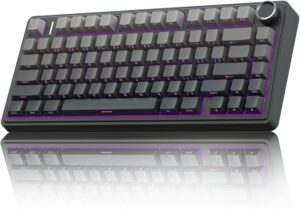
For years, I used whatever keyboard came with my computer.
Big mistake.
After switching to a wireless mechanical keyboard, typing became much more comfortable and enjoyable. The tactile feedback helped me type faster and make fewer mistakes.
The wireless feature also eliminated one more cable from my desk.
What to Look For
- Comfortable key switches
- Long battery life
- Compact layout if desk space is limited
- Multi-device connectivity
If you write reports, emails, blog posts, or spend most of the day typing, a quality keyboard can make a surprisingly large impact.
3. Ergonomic Wireless Mouse
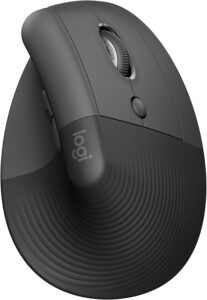
A cheap mouse may seem fine until you use it for eight hours a day.
I learned this after experiencing wrist discomfort during a busy work period.
Switching to an ergonomic wireless mouse immediately improved comfort.
Popular options often include programmable buttons that can speed up repetitive tasks such as copying, pasting, switching applications, or navigating browser tabs.
Best Use Cases
- Graphic design
- Content writing
- Spreadsheet work
- General office tasks
Comfort becomes increasingly important when your workday gets longer.
4. Noise-Canceling Headphones
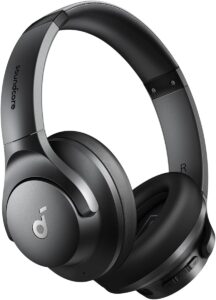
This was probably the gadget that improved my focus more than any other.
Even at home, distractions are everywhere.
Neighbors mowing lawns.
Traffic noise.
Television sounds from another room.
Noise-canceling headphones help create a personal workspace regardless of what’s happening around you.
I often don’t even play music. The noise cancellation alone helps me stay focused.
Bonus Tip
Try instrumental music or ambient sounds when working on deep-focus tasks. Many people find it easier to concentrate without lyrics competing for attention.
5. Smart Desk Lamp

Not all lighting is created equal.
A smart desk lamp lets you adjust brightness and color temperature depending on the time of day.
I usually prefer bright white light in the morning and warmer light during evening work sessions.
This small adjustment helps reduce fatigue and makes long workdays more comfortable.
Features Worth Having
- Adjustable brightness
- Color temperature control
- Touch controls
- USB charging ports
Good lighting often gets overlooked until you experience the difference.
6. Standing Desk Converter
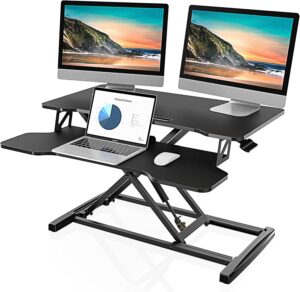
I wasn’t ready to buy a full standing desk, so I started with a standing desk converter.
It sits on top of your existing desk and allows you to alternate between sitting and standing.
Initially, I thought standing all day would make me more productive.
It didn’t.
The real benefit came from changing positions throughout the day.
Standing during meetings, brainstorming sessions, or phone calls helped me stay more engaged and energized.
Lesson Learned
The goal isn’t standing constantly.
The goal is movement and variety.
7. USB-C Docking Station
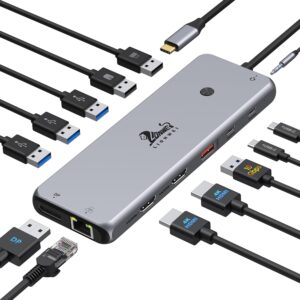
Modern home offices often involve multiple devices.
Laptop.
Monitor.
Keyboard.
External drives.
Webcam.
Charging cables.
Without a docking station, connecting everything can become frustrating.
A USB-C dock allows you to connect multiple accessories through a single cable.
Every morning, I simply plug one cable into my laptop and everything works instantly.
Benefits
- Cleaner desk setup
- Faster workstation setup
- Better cable management
- Increased productivity
It’s one of those gadgets you don’t fully appreciate until you’ve used one.
8. Webcam with Better Video Quality
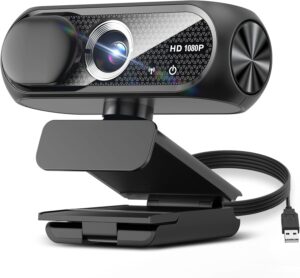
Video meetings have become a normal part of remote work.
The built-in laptop camera usually gets the job done, but upgrading to a dedicated webcam can significantly improve image quality.
I noticed this especially during client meetings and presentations.
A clearer image looks more professional and helps create a better impression.
What Matters Most
- Good low-light performance
- Reliable autofocus
- Clear image quality
- Easy setup
You don’t necessarily need the most expensive model.
9. Smart Speaker or Voice Assistant
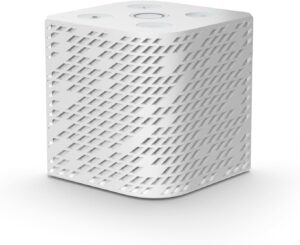
This might sound unusual, but a smart speaker has become a useful productivity tool in my office.
I use voice commands to:
- Set timers
- Create reminders
- Check calendar events
- Control lighting
- Play focus music
Small tasks that would normally interrupt workflow can be handled hands-free.
Those saved seconds add up over time.
10. Cable Management System
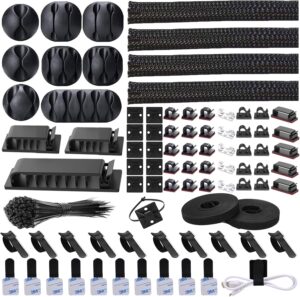
This isn’t the most exciting gadget on the list.
It’s also one of the most valuable.
My desk used to look like a bowl of tangled spaghetti.
Finding the correct charger or unplugging a device became surprisingly annoying.
After installing cable trays, clips, and cable sleeves, my workspace felt cleaner and less stressful.
Why It Helps
A clutter-free environment reduces visual distractions.
You spend less time dealing with cables and more time working.
Sometimes productivity improvements come from organization rather than technology.
Productivity Apps That Pair Well With These Gadgets
Hardware works even better when combined with the right software.
Here are a few tools I’ve found useful:
Notion
Excellent for organizing projects, notes, and tasks.
Todoist
Simple and effective task management.
Google Calendar
Great for scheduling focused work sessions.
Trello
Useful for visual project management.
Microsoft OneNote
Perfect for meeting notes and brainstorming.
You don’t need all of them. Pick one system and stick with it.
Common Productivity Gadget Mistakes
I’ve made plenty of mistakes while building my workspace.
Here are some worth avoiding.
Buying Too Many Gadgets at Once
It’s tempting to upgrade everything immediately.
Instead, identify your biggest problem first.
Poor lighting?
Back pain?
Distractions?
Fix one issue at a time.
Choosing Looks Over Function
Some gadgets look amazing in photos but aren’t practical for daily use.
Focus on comfort and usability before aesthetics.
Ignoring Ergonomics
An expensive gadget won’t help much if your posture is poor.
Monitor height, chair support, and desk positioning matter more than many people realize.
Chasing Every Productivity Trend
Not every popular gadget will fit your workflow.
The best setup is the one that solves your specific problems.
How to Build a Productive Home Office Step by Step
If you’re starting from scratch, here’s the approach I’d recommend:
Step 1: Improve Comfort
Start with your chair, keyboard, and mouse.
Step 2: Upgrade Lighting
Add a monitor light bar or smart desk lamp.
Step 3: Reduce Distractions
Invest in noise-canceling headphones.
Step 4: Organize Your Desk
Implement cable management and declutter.
Step 5: Add Convenience Tools
Consider a docking station, webcam, or smart speaker.
This gradual approach saves money and ensures every purchase has a purpose.
Final Thoughts
After years of working from home, I’ve learned that productivity isn’t about having the most expensive office setup. It’s about creating an environment that removes distractions, reduces discomfort, and helps you stay focused.
Some of the gadgets on this list cost very little, yet they made a noticeable difference in my daily workflow. Others required a larger investment but paid for themselves through improved comfort and efficiency.
Start with the problems you face most often. Maybe it’s poor lighting, constant noise, or a cluttered desk. Solve those first, and you’ll likely notice productivity improvements long before you build the perfect home office.
The best productivity gadget is the one that makes your workday easier without you having to think about it.