Studying Got Easier Once I Fixed My Desk Setup
A few years ago, my study desk was a mess. Pens disappeared every other day, charging cables tangled together, and I constantly wasted time looking for notes instead of actually studying.
I thought productivity was all about motivation, but I eventually realized that my workspace was part of the problem.
After trying different desk accessories over several semesters, I found that a few simple additions made studying more comfortable, reduced distractions, and helped me stay organized. The best part is that most of them weren’t expensive.
If you’re a student trying to create a better study environment, these are the desk accessories that genuinely make a difference.
Quick Comparison Table
| Product | Best For | Price Range |
|---|---|---|
| Adjustable Laptop Stand | Better posture | $$ |
| LED Desk Lamp | Eye comfort | $$ |
| Desk Organizer | Decluttering | $ |
| Wireless Mouse | Productivity | $$ |
| Cable Management Clips | Clean workspace | $ |
| Monitor Light Bar | Screen-focused studying | $$$ |
| Desk Mat | Comfort and organization | $$ |
| Phone Stand | Multitasking | $ |
| USB Hub | Device connectivity | $$ |
| Noise-Canceling Headphones | Focus sessions | $$$ |
Best Overall Pick
Adjustable Laptop Stand
If I could recommend only one accessory to students, it would be a laptop stand.
Most students spend hours looking down at their laptop screens. I did the same and constantly experienced neck and shoulder discomfort. Raising the screen to eye level made an immediate difference.
A good adjustable stand improves posture, keeps your desk organized, and often helps with laptop cooling.
Pros
- Improves posture
- Reduces neck strain
- Better airflow for laptops
- Portable and easy to store
Cons
- Usually requires an external keyboard for maximum comfort
- Some cheaper models wobble
Budget Pick
Cable Management Clips
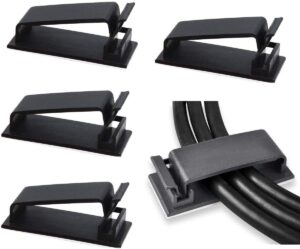
This may sound boring, but cable clips solved one of the most annoying problems on my desk.
Before using them, charging cables regularly fell behind the desk. I spent more time searching for cables than I’d like to admit.
Pros
- Extremely affordable
- Easy to install
- Keeps desk neat
- Prevents cable damage
Cons
- Small accessory that is easy to overlook
- Adhesive quality varies
Premium Pick
Noise-Canceling Headphones
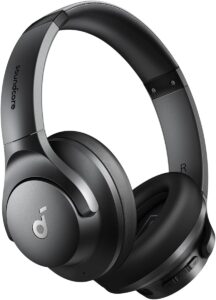
When exams approach and every small sound becomes distracting, noise-canceling headphones become incredibly valuable.
I first tried them during a busy library session and was surprised by how much easier it was to stay focused.
Pros
- Excellent concentration aid
- Great for online classes
- Comfortable for long sessions
- Useful beyond studying
Cons
- Expensive
- Requires charging
10 Best Desk Accessories for Students
1. Adjustable Laptop Stand
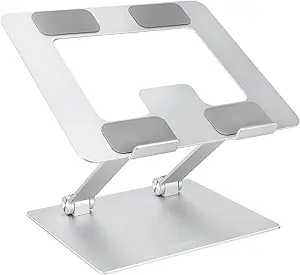
A laptop stand creates a healthier studying position and encourages better posture during long sessions.
Students who spend several hours a day writing papers, attending online classes, or researching will notice the benefits quickly.
Pros
- Ergonomic setup
- Better cooling
- Portable
Cons
- Additional keyboard may be needed
2. LED Desk Lamp
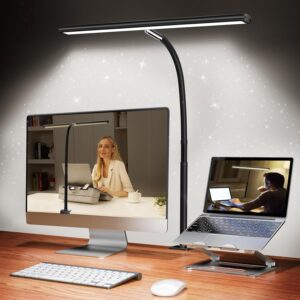
Lighting affects focus more than most students realize.
I used to rely solely on room lighting, but adding a dedicated desk lamp reduced eye strain during late-night study sessions.
Look for adjustable brightness and color temperature settings.
Pros
- Reduces eye fatigue
- Improves visibility
- Useful for reading textbooks
Cons
- Takes up desk space
3. Desk Organizer
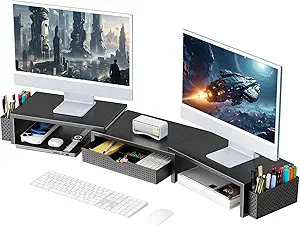
A desk organizer helps keep pens, sticky notes, highlighters, chargers, and other essentials within reach.
One of my biggest mistakes was assuming organization wasn’t important. Once everything had a designated spot, I wasted less time searching for supplies.
Pros
- Reduces clutter
- Saves time
- Affordable
Cons
- Needs occasional cleaning
4. Wireless Mouse

Trackpads are fine for quick tasks, but they become frustrating during long research sessions.
A wireless mouse makes navigating documents, spreadsheets, and presentations significantly easier.
Pros
- More comfortable than a trackpad
- Improves productivity
- Portable
Cons
- Requires batteries or charging
5. Cable Management Clips
Small accessory, big improvement.
These keep charging cables organized and prevent your workspace from looking chaotic.
Pros
- Inexpensive
- Simple installation
- Cleaner appearance
Cons
- Adhesive may wear out over time
6. Monitor Light Bar
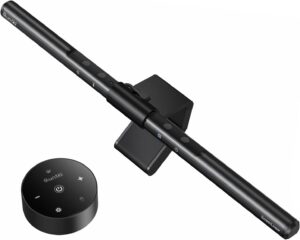
A monitor light bar sits above your screen and illuminates your desk without creating glare.
This became one of my favorite upgrades for evening study sessions.
Pros
- Saves desk space
- Reduces screen reflections
- Comfortable lighting
Cons
- More expensive than standard lamps
7. Desk Mat
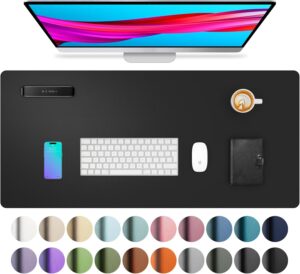
A large desk mat creates a dedicated workspace and protects the desk surface.
It also makes writing and using a mouse feel smoother.
Pros
- Comfortable surface
- Improves aesthetics
- Easy to clean
Cons
- Requires desk space
8. Phone Stand
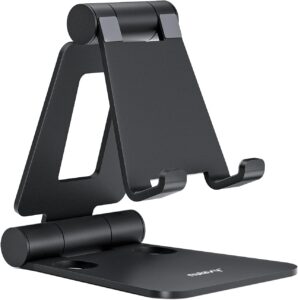
Students often use phones for timers, study apps, online references, and video calls.
A simple stand keeps the screen visible without constantly picking up the device.
Pros
- Better ergonomics
- Useful during online classes
- Affordable
Cons
- Doesn’t reduce distractions by itself
9. USB Hub
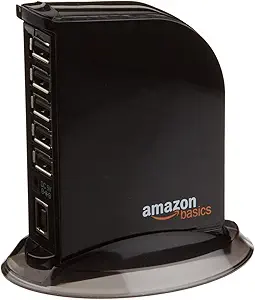
Modern laptops often have limited ports.
A USB hub becomes essential when connecting flash drives, keyboards, mice, microphones, and external storage.
Pros
- Expands connectivity
- Convenient for students
- Portable
Cons
- Higher-quality hubs cost more
10. Noise-Canceling Headphones
Whether you’re studying in a dorm, library, or coffee shop, distractions are everywhere.
Noise-canceling headphones help create a focused environment almost instantly.
Pros
-
- Improved concentration
- Better online learning experience
- Comfortable for long sessions
Cons
- Premium pricing
How to Build a Student-Friendly Desk Setup
If you’re starting from scratch, here’s the order I’d recommend:
Step 1: Fix Your Posture
Start with a laptop stand or monitor riser.
Step 2: Improve Lighting
Add a desk lamp or monitor light bar.
Step 3: Organize Essentials
Use a desk organizer and cable clips.
Step 4: Upgrade Comfort
Add a desk mat and wireless mouse.
Step 5: Improve Focus
Consider noise-canceling headphones if distractions are a problem.
Following this sequence gives the biggest productivity improvements without overspending.
Common Mistakes Students Make
Buying Too Many Accessories at Once
I made this mistake myself.
A desk filled with gadgets doesn’t automatically improve productivity. Start with essentials and add items gradually.
Ignoring Ergonomics
Many students spend money on aesthetics while overlooking comfort.
Your neck, back, and wrists will thank you for prioritizing ergonomics.
Choosing Style Over Function
Some accessories look amazing online but don’t actually solve a problem.
Always ask:
“What issue will this accessory fix?”
Letting Clutter Return
Even the best organizer won’t help if you stop using it consistently.
Take two minutes at the end of each study session to reset your workspace.
Frequently Asked Questions
What is the most useful desk accessory for students?
An adjustable laptop stand is often the most impactful upgrade because it improves posture and comfort during long study sessions.
Are expensive desk accessories worth it?
Not always. Many affordable accessories such as cable clips, phone stands, and desk organizers provide excellent value.
How can I make my study desk more productive?
Focus on ergonomics, lighting, organization, and minimizing distractions. Small improvements in these areas often have a bigger impact than expensive gadgets.
Do students need a desk lamp if the room is already bright?
Usually yes. A dedicated desk lamp provides focused lighting for reading and writing, especially during evening study sessions.
Which accessory helps concentration the most?
For many students, noise-canceling headphones provide the biggest improvement in focus, particularly in shared living spaces.
Final Recommendation
If you’re building a student desk setup today, start with an adjustable laptop stand, a quality desk lamp, and a simple desk organizer. These three accessories provide the biggest improvements in comfort and productivity for most students.
If your budget allows, add a wireless mouse, desk mat, and noise-canceling headphones later. The goal isn’t to create a desk full of gadgets—it’s to create a workspace that helps you study with fewer distractions and more comfort.
A well-organized desk won’t magically improve your grades, but it can remove many of the small frustrations that make studying harder than it needs to be.