
Introduction
A few years ago, I tried squeezing a full work setup onto a tiny desk in my bedroom. At first, I thought the problem was the desk itself. I spent weeks looking at larger desks online before realizing something important: the real issue wasn’t the desk size—it was how poorly I was using the space I already had.
My keyboard barely fit beside my notebook. Charging cables were everywhere. My monitor sat too low, causing neck pain after long work sessions. By the end of the day, the workspace looked more like a storage shelf than a productive desk.
That’s when I started experimenting with compact desk accessories designed specifically for small workspaces. Some purchases were excellent. Others turned out to be complete wastes of money.
If you’re working with limited desk space, these are the compact accessories that genuinely make a difference without turning your setup into a cluttered mess.
Quick Comparison Table
| Product | Best For | Space Saving | Price Range |
|---|---|---|---|
| Monitor Riser | Extra storage under monitor | High | $$ |
| Laptop Stand | Better posture | High | $ |
| Compact Wireless Keyboard | Smaller footprint | High | $$ |
| Desk Shelf Organizer | Vertical storage | Very High | $$ |
| Cable Management Box | Cleaner setup | Medium | $ |
| USB-C Hub | Fewer cables and adapters | High | $$ |
| Desk Drawer Organizer | Hidden storage | Medium | $ |
| Monitor Light Bar | Better lighting without desk lamps | High | $$ |
1. Monitor Riser

A monitor riser was the first accessory that transformed my workspace.
Before using one, my monitor sat directly on the desk, leaving wasted space underneath. Once I added a riser, I suddenly had room to store notebooks, external drives, and small accessories.
Pros
- Improves viewing height
- Creates additional storage space
- Reduces desk clutter
- Easy to install
Cons
- Some models are bulky
- Cheap versions may wobble
Best For
Anyone using an external monitor and wanting instant extra storage.
2. Laptop Stand

If you work from a laptop every day, a stand is one of the best upgrades you can make.
I used to spend hours looking down at my screen, which eventually led to neck and shoulder discomfort. A simple aluminum laptop stand raised the screen to eye level and immediately improved my posture.
Pair it with an external keyboard and mouse for the best experience.
Pros
- Improves ergonomics
- Better airflow for laptops
- Creates more desk space underneath
Cons
- Requires separate keyboard and mouse
- Not ideal for frequent movement
Best For
Remote workers and students using laptops for long periods.
3. Compact Wireless Keyboard

One mistake I made early on was buying a full-sized keyboard for a small desk.
While it worked well, it consumed valuable space. Switching to a compact wireless keyboard instantly freed up room for note-taking, coffee cups, and other essentials.
Popular compact layouts include:
- 60%
- 65%
- 75%
- Tenkeyless (TKL)
For most people, a 75% keyboard offers the best balance between size and functionality.
Pros
- Saves significant desk space
- Reduces cable clutter
- Easy to transport
Cons
- Smaller layouts require adjustment
- Some keys may be removed
Best For
Minimalist desk setups and small workspaces.
4. Desk Shelf Organizer

A desk shelf organizer is probably the most underrated compact desk accessory.
Instead of spreading items across the desk surface, it uses vertical space that would otherwise go unused.
I keep my headphones, notebooks, and charging accessories on mine, leaving the actual desk clear for work.
Pros
- Maximizes vertical storage
- Makes desk look organized
- Great for small desks
Cons
- Can look crowded if overfilled
- Requires some assembly
Best For
People working with limited desk depth.
5. Cable Management Box

Nothing makes a compact setup feel smaller than tangled cables.
At one point, I had power strips, chargers, USB cables, and extension cords visible from every angle. The desk felt messy even when everything else was organized.
A cable management box hides:
- Power strips
- Adapters
- Charging bricks
- Excess cable length
The improvement in appearance is surprisingly dramatic.
Pros
- Instantly cleaner setup
- Improves safety
- Reduces visual clutter
Cons
- Takes up some floor space
- Larger adapters may not fit
Best For
Anyone dealing with multiple charging devices.
6. USB-C Hub

Modern laptops often have very few ports.
I learned this lesson after buying a new laptop and realizing I couldn’t connect my monitor, mouse, external drive, and SD card at the same time.
A compact USB-C hub solved the problem immediately.
Look for hubs that include:
- HDMI
- USB-A ports
- SD card reader
- USB-C charging pass-through
Pros
- Expands connectivity
- Reduces adapter clutter
- Great for travel
Cons
- Can get warm under heavy use
- Cheap hubs may be unreliable
Best For
Laptop users who need multiple connections.
7. Desk Drawer Organizer

Small accessories tend to disappear when they’re thrown into a drawer.
Pens, USB drives, batteries, sticky notes, and charging cables can quickly become a mess.
A simple drawer organizer creates designated spaces for everything.
The biggest benefit isn’t storage—it’s saving time when you need something quickly.
Pros
- Keeps accessories organized
- Affordable
- Easy to install
Cons
- Only works if your desk has drawers
- Requires occasional maintenance
Best For
People who frequently use small office supplies.
8. Monitor Light Bar
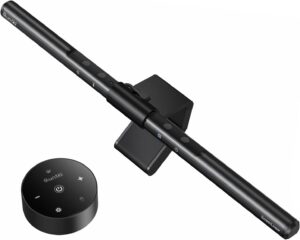
This accessory surprised me the most.
I originally thought it was unnecessary because I already owned a desk lamp. After trying a monitor light bar, I understood why so many people recommend them.
Unlike traditional lamps, a light bar sits on top of the monitor and illuminates the desk without taking up workspace.
Pros
- Saves desk space
- Reduces screen glare
- Improves nighttime visibility
Cons
- More expensive than basic lamps
- Not compatible with every monitor
Best For
Late-night workers and content creators.
How to Build a Compact Desk Setup Step by Step
If you’re starting from scratch, here’s the order I recommend:
Step 1: Fix Ergonomics
Start with:
- Laptop stand or monitor riser
- External keyboard
- Mouse
Comfort should come before aesthetics.
Step 2: Manage Cables
Add:
- Cable management box
- Cable clips
- Velcro ties
This immediately makes the desk feel larger.
Step 3: Use Vertical Space
Install:
- Desk shelf organizer
- Monitor riser storage
Think upward instead of outward.
Step 4: Reduce Desk Footprint
Switch to:
- Compact keyboard
- Wireless peripherals
- USB-C hub
Fewer accessories mean more working space.
Common Mistakes to Avoid
Buying Too Many Accessories
I made this mistake myself.
Every productivity video made another gadget look essential. Eventually, the desk became more crowded than before.
Buy accessories that solve specific problems.
Ignoring Ergonomics
A beautiful setup isn’t useful if it causes discomfort.
Always prioritize posture and comfort over appearance.
Keeping Unused Items on the Desk
Many people treat their desk like storage space.
If you don’t use something daily, move it elsewhere.
Poor Cable Management
Even expensive setups look messy when cables are visible everywhere.
Spend time organizing cables properly.
Frequently Asked Questions
What is the most important compact desk accessory?
For most people, a monitor riser or laptop stand offers the biggest improvement because it enhances ergonomics and creates additional storage space.
Are wireless accessories worth it?
Yes. Wireless keyboards and mice significantly reduce cable clutter and make small desks feel more organized.
How can I make a small desk feel bigger?
Use vertical storage, reduce cable clutter, and switch to compact peripherals instead of full-sized accessories.
Is a desk shelf organizer necessary?
Not always, but it’s one of the best ways to maximize limited desk space without buying a larger desk.
What accessories should students prioritize?
Students should focus on a laptop stand, compact keyboard, cable management solution, and a desk organizer.
Final Recommendation
If I were building a compact desk setup today, I’d start with four essentials: a laptop stand or monitor riser, a compact wireless keyboard, a cable management box, and a desk shelf organizer.
Those four accessories deliver the biggest improvement for the least amount of money and instantly make a workspace feel cleaner, more comfortable, and easier to use.
A compact desk doesn’t have to feel cramped. With the right accessories, even a small workspace can be surprisingly productive and enjoyable to work from every day.